Projects within LIMOS✯
The LIMOS can support you during the different stages of project implementation by offering services to facilitate their execution, whether at the functional or administrative level.
Project and data lifecycle✯
If a research project involves data, this data is considered research data and is subject to specific regulations.
Research data
- They are subject to a default openness principle (Open Data) except for exceptions: health data, defense data, or professional secrecy.
- They must be associated with metadata
- Proper data management aims to make them Findable, Accessible, Interoperable (understandable by humans and machines), and Reusable: FAIR
- It is not the researcher but the institution (LIMOS) that owns the research data
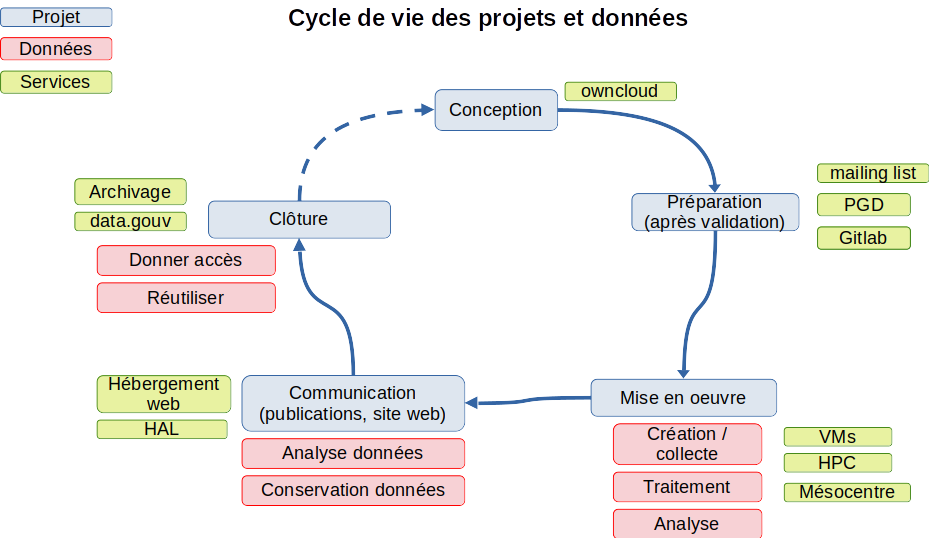
The following diagram shows the interrelation between the stages of a project and the associated data, as well as the services offered by LIMOS for each of these stages.
Some of these services are directly accessible, but to benefit from all services and their full effectiveness, you must start by creating a new instance for your project on MY
Create your project on MY✯
Why create a group for your project
- Associate LIMOS, UCA, or external members with your group
- Benefit from a mailing list usable by all members
- Share documents with this group via Owncloud
Once logged in to my.limos.fr, in the annuaire tab and the groupes sub-tab, create a new group by clicking the green (+) button.
In the following form:
- Indicate the group name
- Provide a description of your project for this group
- Set yourself as the owner; the moderator is optional
- Check the box corresponding to the mailing list
- For groups, leave this blank unless you wish to create a group/project dependent on another, larger group/project
Once done, a request is automatically sent to the IT service for validation.
Finally, you can create new users in MY for each member and associate them with the group.
Services for projects✯
Owncloud✯
When designing a project, it can be practical to have a tool to exchange documents or even collaboratively edit a document (with OnlyOffice).
On owncloud.isima.fr, create a new folder and share it with the group you just created.
See also the Owncloud documentation
Mailing list✯
Once your group is created, you and all group members can communicate via the email address <monprojet>@listes.limos.fr
See also the mailing list documentation
DMP✯
The template mentioned below is being drafted and is not yet finalized
Data Management Plans (DMP) are documents allowing researchers to define a plan for properly managing project data.
Writing a DMP is mandatory in certain cases, such as for ANR projects.
To facilitate its creation and because you cannot answer all questions, LIMOS offers a template to upload to the Opidor web tool.
First, create a profile on Opidor
Then, in Mes plans/tableau de bord, create a new plan.
Select the following options:
- Import an existing plan
- For a research project
- French
- DMP OPIDOR format
- Choose the "ANR - Modèle de PGD structuré" template
Then upload the following document: template_opidor_limos
GitLab✯
On gitlab.limos.fr, you can create repositories and share them with the members you have created.
To do this, members must first log in to the GitLab interface to create a profile.
You can also create a GitLab group with the same name as the one you created in MY and invite members to it.
See also the GitLab documentation
HPC Mésocentre VMs✯
If you need machines for your experiments, you can use:
- A virtual machine with the specifications you require — request it from the IT service
- The HPC — see the documentation
- Contact the UCA Mésocentre if your needs are significant — see the documentation
Web hosting✯
Depending on your needs, you can request from the IT service:
-
A webhost for a simple project presentation in pure HTML
- Ease of writing and deployment
- HTML, CSS, JS
-
A VM for a more complex project requiring specific code
- Freedom in your tools and languages
- You are responsible for the security, evolution of your web app, and any issues
HAL✯
Deposit your publications in HAL in the LIMOS collection — HAL documentation
Archiving✯
With a view to Open Data, research data must be archived and made accessible.
Researchers have several options:
data.gouv✯
data.gouv.fr is a French public data platform.
It includes an API, allows harvesting, has a support team, and offers themed data repositories (but not for computer science).
However, the amount of data that can be deposited is limited.
For a dataset larger than 1 GB, the request may be refused.
Other recognized public repositories✯
The following platforms provide access to themed data repositories (but not for computer science themes).
Again, dataset size will be a limiting factor (~1 GB):
UCA archiving✯
Under negotiation
LIMOS is currently negotiating to secure a research data archiving space
Temporary solution✯
If you need to store a large volume of data, you can have a VM created to store the data.
Contact the IT service.
Entering your project on the LIMOS website✯
When a researcher's project is accepted, they must provide certain information to the lab, specifically to describe their project on the LIMOS website.
- Log in to the LIMOS intranet and click on
Administration du site - Click the
+to define a new project
- Fill in the requested fields (fields in italics are optional):
- General info
- Title and content in French and English
- Optional: Project URL and logo
- Administrative info
- LIMOS project manager, usually yourself (select from the dropdown list)
- Project coordinator (free text for external members)
- Managed by LIMOS (check or uncheck)
- Project type: national, European, international
- Project nature (different from the funder): PIA, CPER, industrial research contracts, etc.
- Responsible organization: UCA, CNRS, etc.
- Start and end dates of the project Optional: Project publication date on the site
- Display the project on the public site: unchecking this box will keep the project in the system but hide it from the public site
- Financial info
- Amount of grants allocated to LIMOS
- Optional: Total grant amount allocated for this project
- Funder (select from a list) and specific funder (free text if the funder is not listed)
- Number of PhDs, PostDocs, and engineer CDDs for the project
- Allocated amount for personnel, equipment, and operations
- Associated organizations
- Select a partner organization
- If the desired organization is not listed, create a new one and then associate it
- Axis and theme
- Indicate the axis and theme of the project manager (usually yourself)
- General info
Once completed, the LIMOS administrative services will be notified and will validate (or reject) the project.
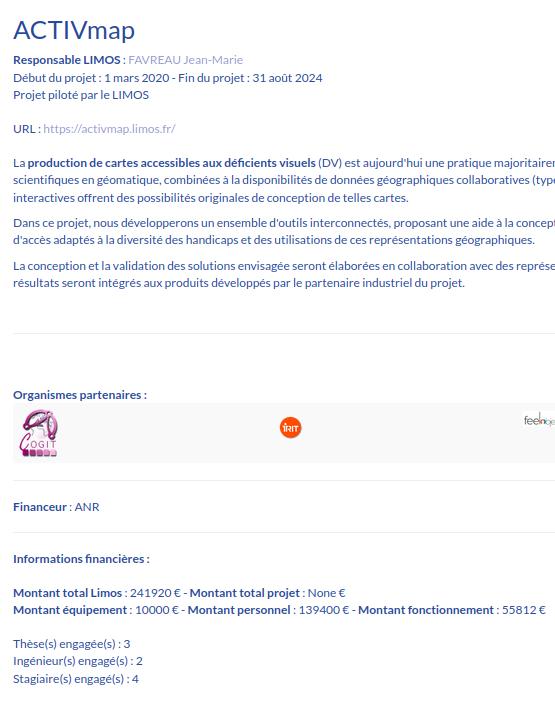
The project will then be visible on the LIMOS website, including partner and funder organizations (see example below).
Financial information about the project will only be visible to logged-in members.